Tool box talks are more than a compliance checkbox—they're a frontline defense against workplace incidents. Yet most teams run ineffective, repetitive sessions because they lack structured tool box talks templates that engage crews and drive real behavioral change. Generic PowerPoint slides or unread handouts won’t cut it. What works are concise, visually clear, and topic-specific templates that fit into short time slots and adapt to changing site conditions.
The problem? Many organizations either skip tool box talks entirely or use outdated formats that fail to connect with workers. Others drown in overly complex templates that require more prep than the actual talk. The solution lies in well-designed, practical tool box talks templates—easy to customize, quick to deliver, and built for impact.
This guide cuts through the noise. You’ll learn what makes a template actually work, how to choose or build one that fits your team, and where to find proven examples across high-risk industries.
Why Most Tool Box Talks Fail (And How Templates Fix It)
Tool box talks often fail because they’re delivered without structure. A supervisor might say, “Let’s talk about PPE today,” then rattle off a few reminders before heading back to work. That’s not a talk—it’s a monologue with no accountability.
Effective tool box talks follow a consistent format: - Clear topic focus - Real-world relevance - Two-way conversation - Documented attendance and understanding
Templates enforce this structure. They turn vague intentions into repeatable processes. Without one, you’re relying on memory and goodwill—two things that falter under pressure.
Common mistakes that templates prevent: - Talking too long (ideal: 10–15 minutes) - Covering too many topics at once - Skipping sign-offs or attendance tracking - Failing to link the topic to current site activity
A strong template keeps you focused. It prompts discussion questions, includes space for signatures, and uses plain language—not corporate jargon. That alone increases retention and engagement.
Key Elements of an Effective Tool Box Talks Template
Not all templates are created equal. The best ones balance completeness with simplicity. Here’s what your tool box talks template should include:
#### 1. Header with Essential Info Quickly identify: - Date - Location/site - Supervisor name - Topic - Duration
This isn’t administrative clutter—it’s audit-ready documentation.
#### 2. Objective Statement One or two sentences stating the purpose. Example: “To review proper lifting techniques and prevent back injuries during material handling.”
This aligns the team and sets the tone.
#### 3. Hazard Identification List 2–4 specific risks related to the topic. For “working at height”: - Unsecured ladders - Missing guardrails - Improper harness use
Makes the danger tangible.
#### 4. Discussion Prompts Open-ended questions that spark conversation: - “Have you seen this hazard on-site?” - “What would you do if you noticed a damaged harness?”
Avoid yes/no questions. You want stories, not silence.
#### 5. Best Practices & Controls Clear, actionable steps: - Inspect ladders before use - Maintain three points of contact - Report defects immediately
Use bullet points. Workers scan—don’t read.

#### 6. Attendee Sign-Off Signature line with printed name, role, and date. Optional: add a “I understand” checkbox. This reinforces accountability.
#### 7. Visual Aid Space Leave room for a sketch, photo, or QR code linking to a short safety video. Visuals improve recall by up to 65% (per visual learning studies).
Top 5 Tool Box Talks Template Formats Used in Industry
Different formats serve different needs. The right one depends on your team size, documentation requirements, and delivery method.
| Format | Best For | Pros | Cons |
|---|---|---|---|
| 1. One-Page PDF | Field crews, quick printing | Lightweight, easy to sign, printer-friendly | Limited space for notes |
| 2. Editable Word/Google Doc | Teams customizing weekly | Fully editable, collaborative | Risk of inconsistent formatting |
| 3. Digital Form (Tablet/Mobile) | Tech-equipped sites | Auto-saves, cloud storage, searchable | Requires devices and training |
| 4. PowerPoint/Slide Deck | Larger groups or training | Visuals, animation, video embeds | Often too long; not discussion-focused |
| 5. Whiteboard Template | Daily stand-ups | Interactive, real-time input | No permanent record unless photographed |
Pro tip: Pair digital tools with printed sign-off sheets. Workers engage more when they write their name on paper—even if the rest is digital.
Real-World Examples of Tool Box Talks Templates
Let’s see how this works in practice.
#### Example 1: Electrical Safety (Construction Site) Topic: Lockout/Tagout Procedures Hazard: Unexpected energizing of circuits Discussion Prompt: “What steps do we miss when in a rush?” Best Practice: “Verify zero energy with a tester—every time.” Visual: Diagram of lockout sequence Duration: 12 minutes Attendees: 8 electricians, signed
This talk happened before starting panel upgrades—timely and relevant.
#### Example 2: Slips, Trips, Falls (Warehouse) Topic: Housekeeping on Loading Docks Hazard: Spilled liquids, misplaced pallets Discussion Prompt: “Where do we see clutter building up?” Best Practice: “Clean as you go—don’t wait for EOD.” Visual: Side-by-side photo: clean vs. cluttered dock Sign-off: All 14 team members
Led to a 40% drop in near-misses over six weeks.
#### Example 3: Heat Stress (Landscaping Crew) Topic: Staying Safe in High Temperatures Hazard: Dehydration, heat exhaustion Discussion Prompt: “What are early signs someone’s struggling?” Best Practice: “Drink water every 15 minutes—even if not thirsty.” Visual: Infographic of symptoms and response steps Follow-up: Supervisor checks hydration at midday
Conducted every spring—before summer peaks.
These aren’t hypotheticals. They reflect templates used by safety managers in OSHA-regulated environments.
How to Customize Templates for Your Team
A template isn’t meant to be rigid. The best ones are frameworks—not scripts.
Start with a base template, then: - Localize the hazard examples (e.g., “crane setup near power lines” vs. generic “electrical hazard”) - Use crew-specific language (avoid “employees”—say “riggers,” “operators,” “laborers”) - Tie to recent incidents or audits (e.g., after a near-miss with scaffolding) - Rotate topics monthly using a safety calendar
One oilfield services company reduced recordables by 30% in eight months by syncing tool box talks with their incident trend reports. They didn’t invent new templates—they made their existing ones relevant.
Also, rotate facilitators. Let experienced workers lead a talk using the template. It builds ownership and gives you fresh delivery styles.
Where to Find Reliable Tool Box Talks Templates
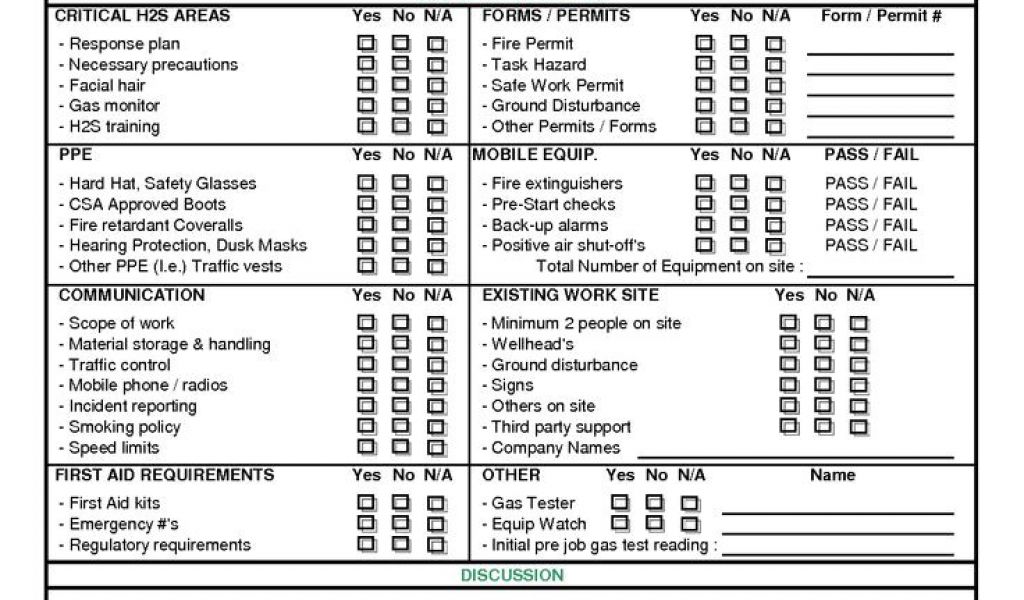
You don’t have to build from scratch. But not all free templates are useful.
High-quality sources: - OSHA.gov – Free, compliant, basic templates (best for starting out) - NIOSH – Research-backed, topic-specific (e.g., respirator use) - SafetyCulture (iAuditor) – 100+ free downloadable templates with digital tracking - Creative Safety Supply – Industry-specific PDFs with visuals - Construction Safety Councils – Regionally tailored (e.g., AGC chapters)
Avoid sites that offer “500+ tool box talks in one bundle.” Quantity kills quality. You’ll drown in irrelevant topics like “cybersecurity awareness” on a demolition site.
- Instead, pick 10 core topics and perfect the templates for them:
- PPE Usage
- Fall Protection
- Hand Tool Safety
- Excavation Hazards
- Hot Work Permits
- Material Handling
- Confined Space Entry
- Electrical Safety
- Emergency Response
- Weather-Related Risks
Master these, then expand.
Integrating Templates into Your Safety Workflow
A template is only as good as its use.
Best practices for rollout: - Train supervisors on how to use the template—not just “do the talk” - Store templates in a shared folder labeled by topic and month - Print and laminate a master copy for the site office whiteboard - Review past talks during weekly safety meetings - Audit template use quarterly: Are they filled out? Are discussions happening?
One manufacturing plant added tool box talk quality to their supervisor KPIs. They scored: - Completeness (all fields filled) - Relevance (topic matched current work) - Engagement (number of questions asked)
Templates improved across the board.
Also, archive completed talks digitally. Scan signed sheets or save digital entries. You’ll need them for OSHA inspections, insurance claims, or incident investigations.
The Bottom Line: Templates Drive Consistency and Compliance
Tool box talks templates aren’t about paperwork—they’re about performance. They turn safety conversations from afterthoughts into repeatable, measurable actions.
The best templates are simple, focused, and built for real work. They don’t require design skills or software. Just a clear structure, a relevant topic, and a team ready to engage.
Start with one template. Test it. Refine it. Scale it.
Your crew doesn’t need perfection. They need clarity, consistency, and a chance to speak up—before an incident happens.
FAQ
What should be included in a tool box talk template? A complete template includes date, location, topic, hazards, discussion prompts, best practices, and attendee sign-offs.
Are tool box talks required by OSHA? OSHA doesn’t mandate tool box talks specifically, but they require regular safety training and hazard communication—tool box talks fulfill both.
How often should tool box talks be held? Weekly is ideal, but frequency depends on risk level. High-hazard sites may do them daily.
Can tool box talks be digital? Yes—many teams use tablets or apps to deliver and document talks, especially for remote or mobile crews.
Who should lead tool box talks? Supervisors typically lead, but experienced workers can facilitate too—especially on technical topics.
Do tool box talks need to be signed? Yes. Signatures confirm attendance and understanding, and serve as legal documentation if needed.
How long should a tool box talk last? Keep it between 10 and 15 minutes. Focus on one topic to maintain engagement.
FAQ
What should you look for in Tool Box Talks Templates That Improve Safety Engagement? Focus on relevance, practical value, and how well the solution matches real user intent.
Is Tool Box Talks Templates That Improve Safety Engagement suitable for beginners? That depends on the workflow, but a clear step-by-step approach usually makes it easier to start.
How do you compare options around Tool Box Talks Templates That Improve Safety Engagement? Compare features, trust signals, limitations, pricing, and ease of implementation.
What mistakes should you avoid? Avoid generic choices, weak validation, and decisions based only on marketing claims.
What is the next best step? Shortlist the most relevant options, validate them quickly, and refine from real-world results.